Should you rent a cloud server and call a model API, or buy a machine and run a model yourself? Start with your tasks, data requirements and measured usage. For most beginners using OpenClaw, a small cloud server plus a metered API is an easier experiment. Local inference deserves consideration when keeping data on premises, offline operation or sustained workloads justify it.
Sources checked: October 25, 2026. Published prices are a dated reference. Hardware budgets, electricity rates and workloads below are explicit planning assumptions, not retailer quotations. This guide covers inference, not training or fine-tuning.
1. Separate the assistant from the model
OpenClaw manages conversations, files, tools and scheduled work. The model interprets requests and generates responses. They do not have to run in the same place.
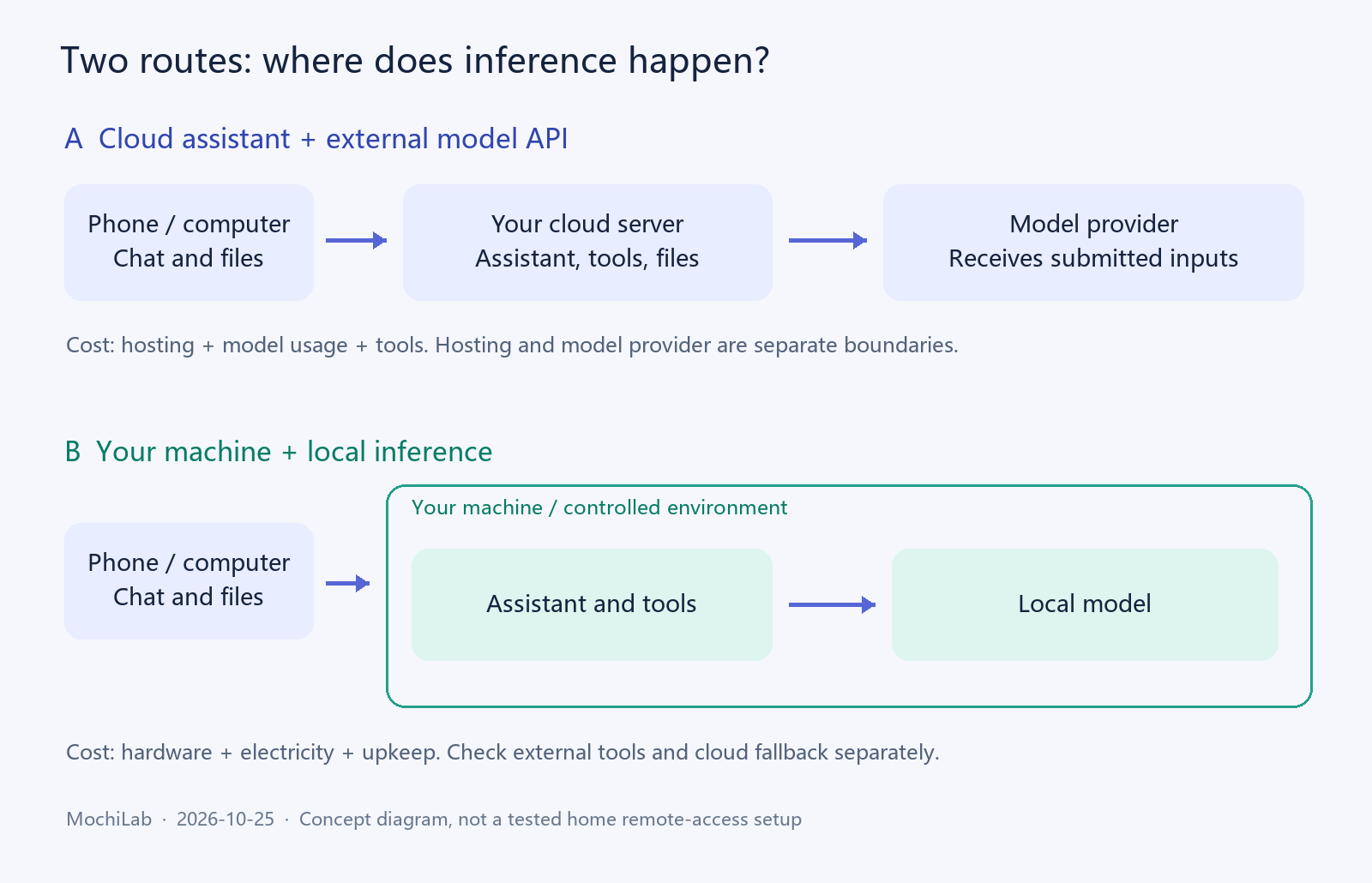
Cloud server + external API
- Assistant runs on: Rented cloud instance
- Model runs on: Model provider infrastructure
- Useful starting point for: Individuals and small teams wanting a quick start
Your computer + external API
- Assistant runs on: Your home or office computer
- Model runs on: Model provider infrastructure
- Useful starting point for: People with an existing always-on computer
Your computer + local model
- Assistant runs on: Your home or office computer
- Model runs on: Your own hardware
- Useful starting point for: Private data, offline work or sustained inference
Cloud GPU + self-hosted model
- Assistant runs on: Rented infrastructure
- Model runs on: Rented GPU infrastructure
- Useful starting point for: Teams needing model control or temporary GPU capacity
A normal 2-vCPU server with 4–8GB RAM can host a light assistant workload. It does not include the GPU needed for substantial model inference. Renting a cloud GPU is another cost model, distinct from purchasing local hardware.
2. Choose around the work you actually do
Chat, translation, email and personal organization
- Sensible starting point: API
- What to check: Infrequent use rarely justifies dedicated hardware before testing
Web research and referenced reports
- Sensible starting point: API or hybrid
- What to check: Search, fetching and source checking need tools; a local model does not automatically know current events
Complex coding and large repositories
- Sensible starting point: Test a capable API first
- What to check: Benchmark multi-file edits, passing tests and tool use on any local alternative
Confidential contracts, internal documents or customer records
- Sensible starting point: Local or explicitly routed hybrid
- What to check: Check embeddings, OCR, logs and fallback too, not just the chat model
Repeated classification and structured extraction
- Sensible starting point: Evaluate a small local model
- What to check: Fixed tasks are measurable; count errors, throughput and human review time
Separate family BOTs
- Sensible starting point: Either
- What to check: Isolate workspaces, memory, files and credentials; measure simultaneous use
Customer support and public services
- Sensible starting point: API or a deliberately sized local service
- What to check: Peak traffic, rate limits, recovery and human handover matter
Offline facilities or field systems
- Sensible starting point: Local
- What to check: Prepare models and dependencies ahead of time; online Skills still need connectivity
Images, transcription and video
- Sensible starting point: Benchmark each modality
- What to check: Require suitable models; text-only prices and memory estimates do not apply directly
Around-the-clock tasks and phone reminders
- Sensible starting point: First establish reliable uptime and delivery
- What to check: Model location alone does not solve locked-phone reception
An existing gaming PC or workstation
- Sensible starting point: Reuse it for a trial
- What to check: Measure speed, memory and power before upgrading
Do not assume that a small open model matches a large commercial API. Reasoning, long documents and reliable tool execution need task-based tests. Model choice, quantization and context settings can change the outcome.
3. Cloud + API has two separate bills
Hosting
For a light assistant, evaluate 2 vCPUs and 4–8GB RAM first. Browser automation, file conversion and multiple users may need more. This is a planning starting point, not a universal minimum.
As a public reference, AWS Lightsail lists Linux/Unix bundles with public IPv4 at $24/month for 2 vCPUs and 4GB RAM, or $44/month for 2 vCPUs and 8GB RAM. Check regional allowances, taxes and extras separately. Official pricing ↗
Compare renewal rates, storage, backups and network allowances, rather than just an introductory promotion. Test reachability from your own phone on mobile data, home Wi-Fi and computer. Also check the server can reach your chosen model API. A region that works for someone else may not work well for you.
Model usage
For a dated illustration, DeepSeek peak, uncached text rates per million tokens are $0.30 input / $1.20 output for Flash, and $1.32 input / $3.96 output for Pro. Off-peak rates are lower. Replace these with your model's current rates. Official pricing and time bands ↗
Monthly model cost = input million tokens × input rate + output million tokens × output rate. Split cached input into its own line when applicable. Tokens are not messages or words.
Monthly input / output: 1M / 0.2M tokens
- Flash model bill: $0.54
- Pro model bill: $2.11
- Total with an assumed $24/month server: Flash / Pro: $24.54 / $26.11
Monthly input / output: 10M / 2M tokens
- Flash model bill: $5.40
- Pro model bill: $21.12
- Total with an assumed $24/month server: Flash / Pro: $29.40 / $45.12
Monthly input / output: 100M / 20M tokens
- Flash model bill: $54.00
- Pro model bill: $211.20
- Total with an assumed $24/month server: Flash / Pro: $78.00 / $235.20
These are calculations, not promised bills for a particular kind of user. Count every BOT, repeated context, agent loop, retry and tool result. Include billable reasoning output. Search, multimodal services, paid Skills and other tools may have additional charges. A web chat subscription is generally a separate product from API credit.
Set a budget and alerts, start small, and inspect a week's actual usage before expanding unattended work.
4. For local hardware, size memory before buying
A rack server is unnecessary for many personal deployments. An existing desktop, workstation or suitable large-memory computer can be a starting point. CPU inference can work, but sufficient RAM alone does not guarantee acceptable speed.
Memory must accommodate model weights, context/KV cache and runtime overhead. System RAM must also support the operating system, assistant and file-processing tools.
For scale, Qwen's official Q4_K_M downloads are approximately 5.03GB for 8B and 19.8GB for 32B. Download size is not total inference memory. These are sizing examples, not a claim that they are the newest or best models. 8B files ↗, 32B files ↗
7–9B
- Planning range for one user and limited context: Try 8–12GB VRAM; 12–16GB leaves more room; 32GB system RAM
- Practical qualification: Light assistants and structured tasks; verify harder work carefully
14B
- Planning range for one user and limited context: 16–24GB VRAM; 32–64GB system RAM
- Practical qualification: Context and exact quantization still matter
30–32B
- Planning range for one user and limited context: 24–48GB VRAM; evaluate 64GB system RAM or more
- Practical qualification: 24GB may be tight; even 32GB does not guarantee long-context concurrency
70B
- Planning range for one user and limited context: Evaluate 48–96GB+ VRAM systems or roughly 96–128GB unified-memory systems
- Practical qualification: Bandwidth, model format and throughput must be tested
These are capacity planning envelopes, not guarantees. CPU offloading can reduce VRAM needs and slow inference. Unified memory and discrete VRAM are not interchangeable performance measures. For mixture-of-experts models, active parameter count is not the complete weight storage requirement.
Long contexts and concurrent requests require additional memory. Ollama documents memory-dependent parallelism; test the actual engine and hardware before relying on multi-GPU operation. Concurrency documentation ↗
Purchase planning envelopes
The following full-system budgets are author-defined allowances for obtaining quotations, not checked current retail offers. They deliberately overlap and do not guarantee a particular model size. Country, warranty, used parts and import costs matter.
No new purchase initially
- What to investigate: Reuse an existing computer and identify its real bottleneck
$900–1,800
- What to investigate: Entry GPU systems; verify exact VRAM, cooling and power supply
$1,800–3,600
- What to investigate: Workstation options around 16–24GB GPU memory, with sufficient RAM and SSD
$3,000–6,000
- What to investigate: Larger-memory GPU or other suitable high-memory systems
$5,000–12,000+
- What to investigate: Some 70B-class, large-memory or multi-GPU configurations; benchmark before committing
These USD envelopes are independent planning allowances, not currency conversions of the Chinese edition. Request a complete quote and a test of your chosen model. “Runs DeepSeek” is insufficient: a small derivative and a full flagship model can have radically different requirements.
5. Compare ownership cost and cash flow
Consider an illustrative $3,000 machine, used for 36 months, consuming an average 150W at the wall around the clock. Assume a 30-day month, $0.15/kWh, and $10/month maintenance allowance. Replace all assumptions with local quotations and measurements.
Monthly energy
- Calculation: 0.15kW × 24 × 30
- Result: 108kWh
Monthly electricity
- Calculation: 108 × $0.15
- Result: $16.20
Recurring monthly cash cost
- Calculation: Electricity + maintenance allowance
- Result: $26.20
Hardware spread over 36 months
- Calculation: $3,000 ÷ 36
- Result: $83.33/month
Average cost including hardware
- Calculation: $83.33 + $26.20
- Result: $109.53/month
First-year cash expenditure
- Calculation: $3,000 + 12 × $26.20
- Result: $3,314.40
Add cooling, UPS, backup storage, downtime, labor, financing and resale value where relevant. GPU rated power is not measured whole-system average power. Occasional use and continuous operation have different energy costs.
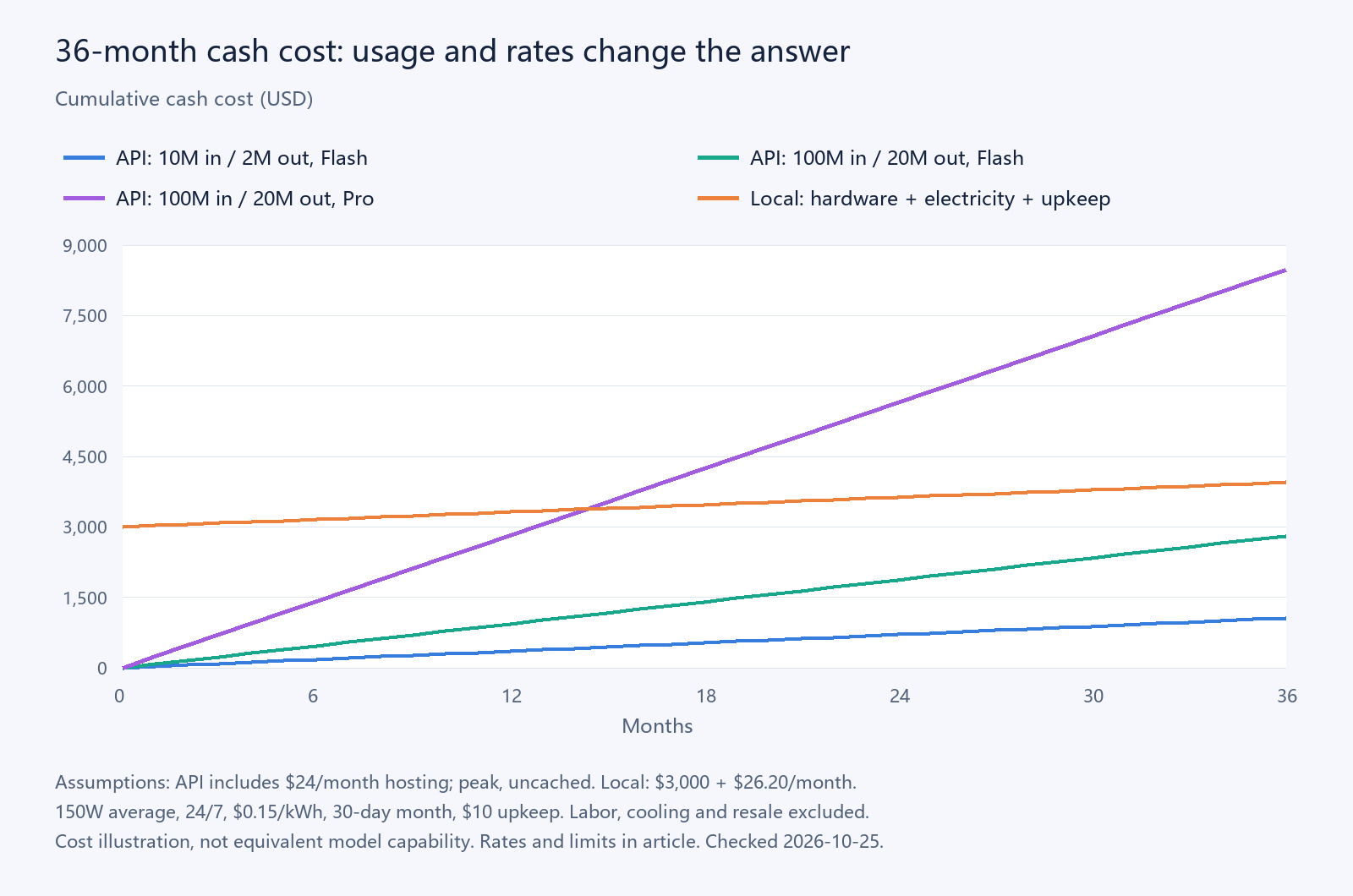
The API lines use the previous section's example rates and a $24/month server. At 36 months, the local example totals $3,943.20, versus $1,058.40, $2,808.00 and $8,467.20 for the three API examples shown. This is a sensitivity illustration, not a benchmark proving equivalent capability.
If local inference fully replaces the $235.20/month service and no extra cloud fees remain, simplified cash payback is $3,000 ÷ ($235.20 − $26.20) ≈ 14.4 months. Against the $29.40/month example, it would take about 938 months, which cannot justify a three-year purchase on savings alone. A zero or negative monthly saving has no such cash payback. Do not add depreciation again in a cash payback calculation; treat shared expenses consistently on both sides.
High volume alone does not prove local is cheaper. Retained API calls, retries and human corrections can consume the apparent saving. Compare the total cost of a successfully completed task.
6. Privacy, networking and responsibility
Data path
- Cloud server + API: Files reside on the cloud server; submitted content reaches the model provider
- Your machine + local model: Inference can stay on your machine; inspect tools and fallback separately
Maintenance
- Cloud server + API: You maintain the assistant, OS, credentials and backups
- Your machine + local model: Also maintain drivers, inference software, weights, cooling and hardware
Availability
- Cloud server + API: Monitoring, backups and recovery remain necessary
- Your machine + local model: Home power, broadband, sleep and reboots also affect uptime
Model updates
- Cloud server + API: Change configuration and regression-test
- Your machine + local model: Download weights, check licensing, capacity and task quality
Multiple users
- Cloud server + API: Require isolation and permissions
- Your machine + local model: Require the same; a shared machine is not an isolation boundary
A local model without cloud fallback can avoid third-party model API charges. The assistant may still call a local API interface. Cloud embeddings, OCR, web search, external Skills or backup services can still send information outside the machine.
Ollama provides OLLAMA_NO_CLOUD=1 to disable its cloud features and binds to localhost by default. This setting does not control other applications. Review all model and tool routes and test with non-sensitive sample data. Ollama FAQ ↗
Home LAN access and access from a phone away from home are different networking problems. Home broadband may not accept inbound connections. Secure remote access needs planning; exposing the entire machine or a bare model endpoint is not a default solution. This article is a decision guide; a complete home-machine walkthrough requires separate testing.
MochiBot is a recommended optional phone client for chat, files, browsing Skills and proactive voice reminders on supported devices. Locked-phone delivery still depends on push support, phone permissions and service state. Choosing local inference does not automatically provide it.
7. Run a small acceptance test first
Collect 20–50 representative, sanitized tasks over a week. Use the same tasks, tool permissions and success criteria on both routes.
- Quality: correct answers, trustworthy references, usable files, passing code tests and real tool execution.
- Speed: time to first output and total task completion; repeat with one and three simultaneous users, tracking failures and queues.
- Cost: all API and tool usage; measured whole-machine electricity for local inference.
- Privacy: where inference, retrieval, logs, backups and fallback actually send data.
- Recovery: restart, lost-network and backup recovery; stop at budget limits and test cross-BOT isolation.
- Human time: minutes spent correcting each result, not just the model's generation time.
8. Your next steps
New or uncertain workload: choose a reachable cloud server → install OpenClaw → configure and test a model API → select a chat client → add needed Skills → review a week's bill.
Private, offline or existing hardware: trial an existing machine → select a local model and engine → connect the assistant → verify tools, data routes and recovery → purchase or upgrade only after acceptance.
Mixed requirements: keep private work local and explicitly route permitted difficult tasks to an API. Set budgets and make outbound routing visible; avoid silent fallback.
MochiBot can be downloaded directly. Compatible third-party Skills are also an option; connect your own MochiLab account when downloading our Skills.