MOCHILAB / GUIDE
iPad: connect to a remote OpenClaw Gateway
Connect through Safari or the official app to chat and review results on iPad.
What runs where
Run the Gateway on a Linux, Mac or Windows/WSL2 computer, and use iPad for chat and approvals. Finish the host tutorial and send a first message there before continuing. Official mobile requirements ↗
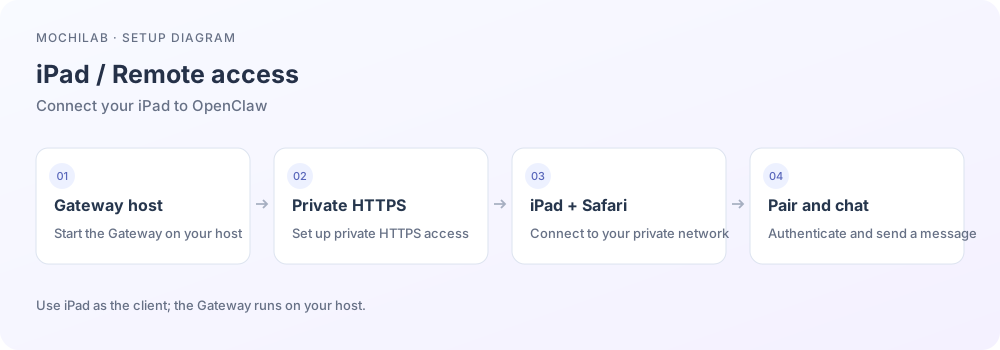
The main route uses Safari with private HTTPS and keeps port 18789 private.
1. Connect a private network
Install Tailscale on the host and iPad, join the same managed tailnet, allow the iPad VPN configuration and connect. Enable MagicDNS and HTTPS certificates. Restrict access to the required devices on host TCP 443. Tailscale iOS/iPad setup ↗
2. Configure the host
Run on the Gateway host, after completing token/password authentication:
openclaw config set gateway.bind loopback
openclaw config set gateway.tailscale.mode serve
openclaw gateway restart
tailscale serve status
Use the actual https://host.your-tailnet.ts.net address in the output. Tailscale Serve makes this address available to authorized tailnet devices. The Gateway remains on loopback. Private HTTPS setup ↗
3. Open Safari and authenticate
Keep Tailscale connected and open that HTTPS address. Complete the requested Gateway authentication/device pairing. Use the token or password for this Gateway. Send a message, close Safari and revisit. Add a home-screen shortcut for convenient access. Control UI authentication ↗
4. Optional native companion
The current official app requires iPadOS 26.2+. Follow the official page to its App Store entry and check local availability. Generate a mobile setup code/QR from the Gateway Control UI Devices page, then scan or paste it in the app's Settings→Gateway. The app connects over WebSocket using the HTTPS access path you prepared. Official pairing steps ↗
5. SSH alternative
A client explicitly supporting local port forwarding can forward local 18789 to the host's loopback 18789. The desktop CLI equivalent is:
ssh -N -L 18789:127.0.0.1:18789 YOUR_USER@YOUR_SERVER
Run this through an SSH client that supports forwarding. iPad background restrictions may interrupt the tunnel; private HTTPS is the easier everyday option. SSH remote access ↗
6. Troubleshoot by layer
Check that the host is awake, Tailscale is connected, DNS/443 policy permits access, and Gateway pairing is complete. If the page works but replies fail, inspect model access on the host. Keep Gateway authentication enabled while checking these steps. Troubleshooting ↗